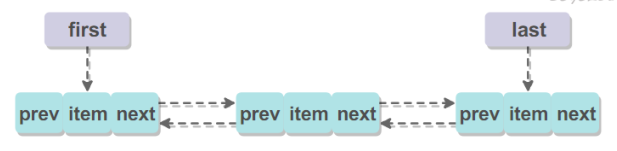
Object[] a = c.toArray(); int numNew = a.length; if (numNew == 0) returnfalse;
Node<E> pred, succ; if (index == size) { succ = null; pred = last; } else { succ = node(index); pred = succ.prev; }
for (Object o : a) { @SuppressWarnings("unchecked") E e = (E) o; Node<E> newNode = new Node<>(pred, e, null); if (pred == null) first = newNode; else pred.next = newNode; pred = newNode; }
if (succ == null) { last = pred; } else { pred.next = succ; succ.prev = pred; }
//固定位置删除,返回要删除的元素 public E remove(int index){ Objects.checkIndex(index, size);
modCount++; E oldValue = elementData(index);
int numMoved = size - index - 1; //向前移动一位 if (numMoved > 0) System.arraycopy(elementData, index+1, elementData, index, numMoved); //最后一位置空,size减小1 elementData[--size] = null; // clear to let GC do its work
return oldValue; } //删除指定元素 publicbooleanremove(Object o){ if (o == null) { for (int index = 0; index < size; index++) if (elementData[index] == null) { fastRemove(index); returntrue; } } else { for (int index = 0; index < size; index++) if (o.equals(elementData[index])) { fastRemove(index); returntrue; } } returnfalse; }
privatevoidfastRemove(int index){ modCount++; int numMoved = size - index - 1; if (numMoved > 0) System.arraycopy(elementData, index+1, elementData, index, numMoved); elementData[--size] = null; // clear to let GC do its work }
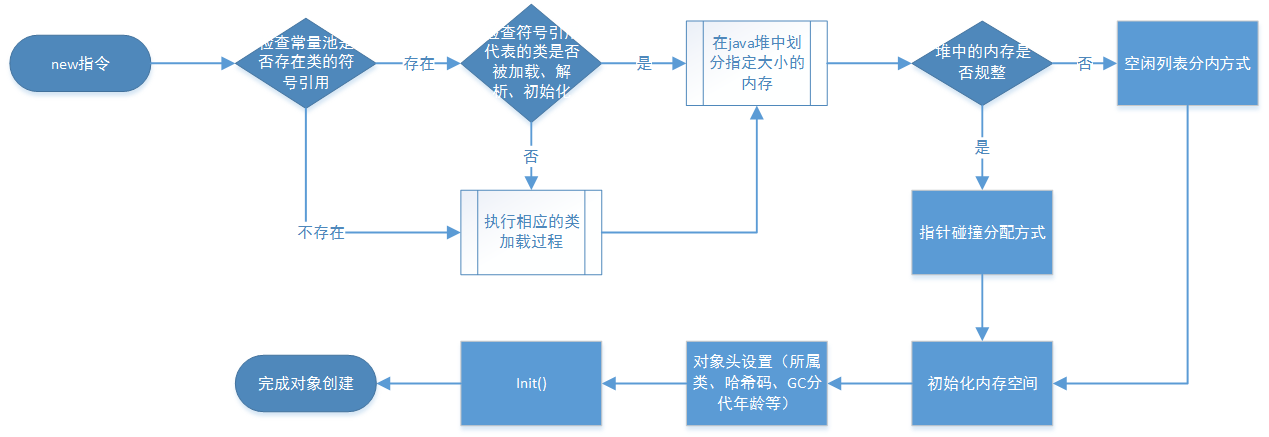
为对象分配空间的任务等同于把一块确定大小的内存从Java堆中划分出来。假设Java堆中内存是绝对规整的,所有用过的内存都放在一边,空闲的内存放在另一边,中间放着一个指针作为分界点的指示器,那所分配内存就仅仅是把那个指针向空闲空间那边挪动一段与对象大小相等的距离,这种分配方式称为“指针碰撞”(Bump the Pointer)。
对象创建在虚拟机中是非常频繁的行为,即使是仅仅修改一个指针所指向的位置,在并发情况下也并不是线程安全的。解决这个问题有两种方案,一种是对分配内存空间的动作进行同步处理——实际上虚拟机采用CAS配上失败重试的方式保证更新操作的原子性;另一种是把内存分配的动作按照线程划分在不同的空间之中进行,即每个线程在Java堆中预先分配一小块内存,称为本地线程分配缓冲(Thread Local Allocation Buffer,TLAB)。哪个线程要分配内存,就在哪个线程的TLAB上分配,只有TLAB用完并分配新的TLAB时,才需要同步锁定。虚拟机是否使用TLAB,可以通过-XX:+/-UseTLAB参数来设定。
"C:\Program Files\Java\jdk-9.0.4\bin\java.exe" -Xms20M -Xmx20M "-javaagent:C:\Program Files\JetBrains\IntelliJ IDEA 2018.1.8\lib\idea_rt.jar=14378:C:\Program Files\JetBrains\IntelliJ IDEA 2018.1.8\bin" -Dfile.encoding=UTF-8 -classpath D:\myfiles\workspace\java\java_data_structure\target\classes OOM.HeapOOM Exception in thread "main" java.lang.OutOfMemoryError: Java heap space at java.base/java.util.Arrays.copyOf(Arrays.java:3719) at java.base/java.util.Arrays.copyOf(Arrays.java:3688) at java.base/java.util.ArrayList.grow(ArrayList.java:237) at java.base/java.util.ArrayList.grow(ArrayList.java:242) at java.base/java.util.ArrayList.add(ArrayList.java:467) at java.base/java.util.ArrayList.add(ArrayList.java:480) at OOM.HeapOOM.main(HeapOOM.java:16) Process finished with exit code 1
publicclassTest{ public Object instance = null; publicstaticvoidmain(String[] args){ Test a = new Test(); Test b = new Test(); a.instance = b; b.instance = a; } }
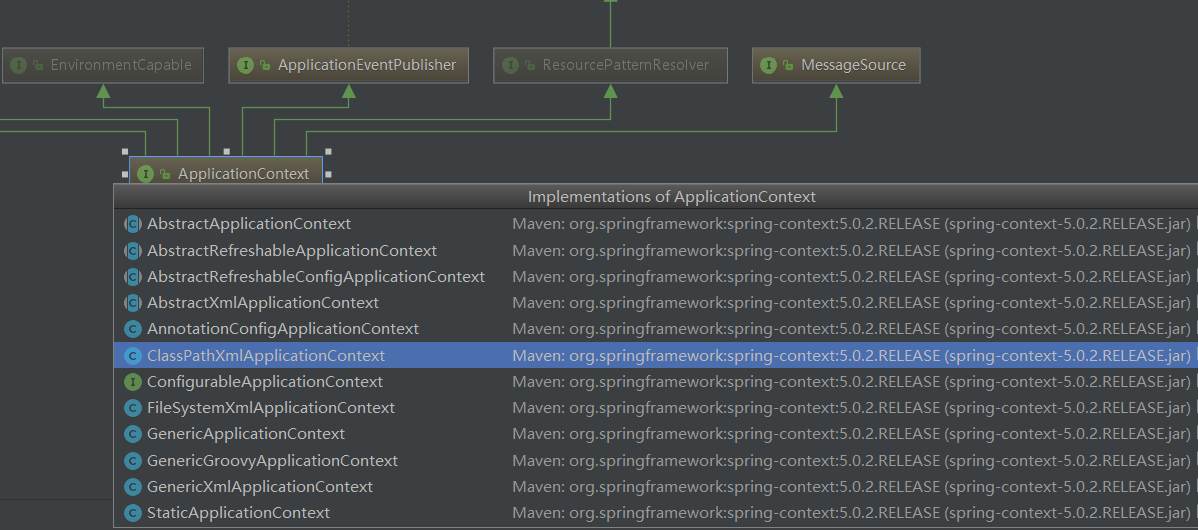
FileSystemXmlApplicationContext:可以加载磁盘任意路径下的配置文件(必须有访问权限)ApplicationContext ac = new FileSystemXmlApplicationContext("C:\\Users\\HASEE\\Desktop\\application.xml");
AnnotationConfigApplicationContext:用于读取注解创建容器的
BeanFactory 和 ApplicationContext 的区别
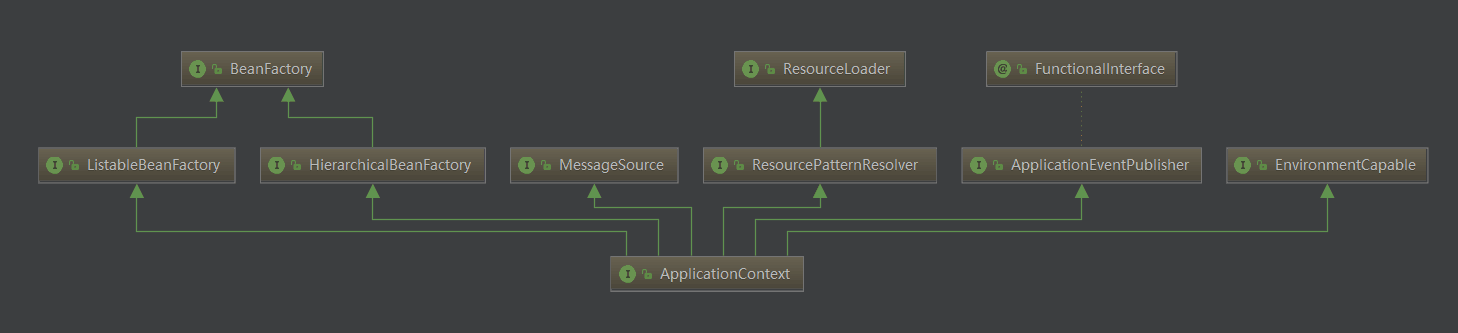
BeanFactory 才是 Spring 容器中的顶层接口,ApplicationContext 是它的子接口。
import axios from'axios' let data = {"code":"1234","name":"yyyy"}; axios.post(`${this.$url}/test/testRequest`,data) .then(res=>{ console.log('res=>',res); })
Content-Type: multipart/form-data
1
2
3
4
5
6
7
8
import axios from'axios' let data = new FormData(); data.append('code','1234'); data.append('name','yyyy'); axios.post(`${this.$url}/test/testRequest`,data) .then(res=>{ console.log('res=>',res); })
Content-Type: application/x-www-form-urlencoded
1 2 3 4 5 6 7 8 9
import axios from'axios' import qs from'Qs' let data = {"code":"1234","name":"yyyy"}; axios.post(`${this.$url}/test/testRequest`,qs.stringify({ data })) .then(res=>{ console.log('res=>',res); })
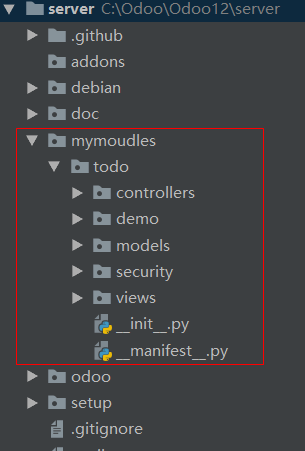
'summary': """ Short (1 phrase/line) summary of the module's purpose, used as subtitle on modules listing or apps.openerp.com""",
'description': """ Long description of module's purpose """,
'author': "My Company", 'website': "http://www.yourcompany.com",
# Categories can be used to filter modules in modules listing # Check https://github.com/odoo/odoo/blob/master/odoo/addons/base/module/module_data.xml # for the full list 'category': 'Uncategorized', 'version': '0.1',
# any module necessary for this one to work correctly 'depends': ['base'],